Screen Studio for Windows.
Finally.
BeerShot is the missing screen capture and recording tool Windows deserved. Beautiful screenshots, cinematic recordings, floating webcam PiP, and annotations — all in one.
One-time purchaseNo subscriptionWindows 10/11

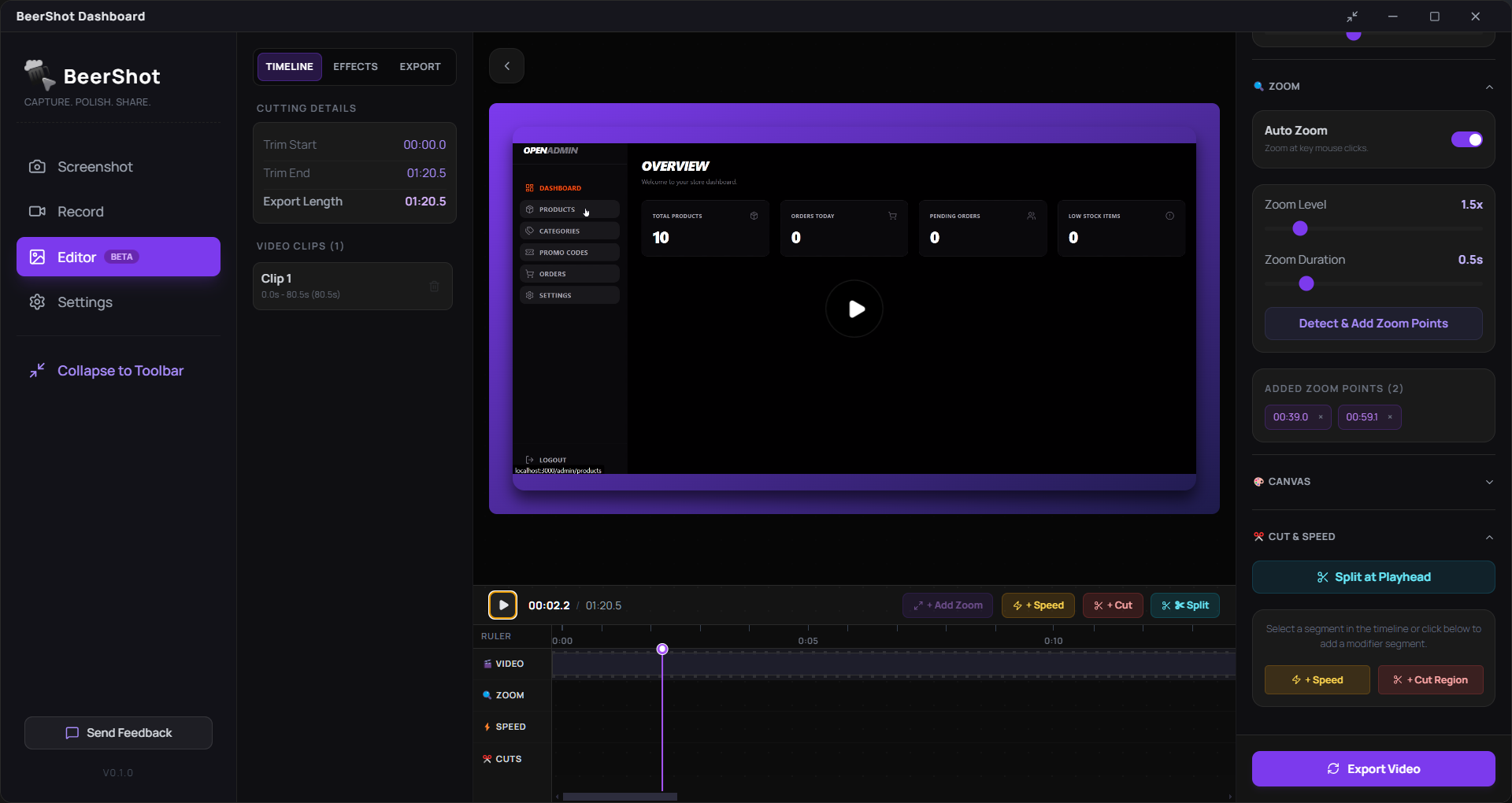
Everything you need.
Nothing you don't.
Replace 4 apps with one. BeerShot handles capture, recording, and export.
Beautiful Screenshots
Capture full screen, any window, or draw a custom region. Auto background, padding, corner radius, and shadow applied instantly.
4K Screen Recording
Record your entire screen in up to 4K 60fps. Microphone and system audio captured simultaneously with zero lag.
Region Screenshot
Draw any region on your screen using our Snipping Tool-style selector. Marching ants, dimension tooltip, corner handles — all included.
Floating Webcam PiP
Your webcam floats as an always-on-top overlay — stays visible even when you switch apps. Circle or rectangle shape, draggable anywhere.
Cinematic Auto Zoom
BeerShot analyzes your recording frame by frame and automatically adds cinematic zoom points at action moments. No keyframes. No manual work.
Smooth Cursor Motion
Shaky, rapid mouse movements are transformed into smooth, beautiful glides automatically in post-processing.
Annotations
Add arrows, text, highlights, and blur/redact boxes to screenshots or videos. Non-destructive layers with full undo/redo.
Global Shortcuts
Ctrl+Shift+S for screenshot, Ctrl+Shift+R for recording. Works even when BeerShot is minimized or hidden in the background.
Capture to export in 3 steps.
🎯Capture
Click capture or press Ctrl+Shift+S. Choose full screen, a window, or draw a region.
✨Polish
BeerShot auto-applies background, zoom, smooth cursor, and your annotations.
📤Share
Export as PNG, MP4, GIF, or copy to clipboard. Done in seconds.
❌ Without BeerShot
- ✕Snipping Tool for screenshots (no backgrounds)
- ✕OBS for recording (complex setup)
- ✕No smooth cursor or auto zoom on Windows
- ✕No auto zoom anywhere on Windows
- ✕No webcam PiP that stays visible
- ✕Switching between 4+ apps constantly
✅ With BeerShot
- ✓Beautiful screenshots with auto backgrounds
- ✓4K recording in 2 clicks
- ✓Smooth cursor + cinematic zoom automatically
- ✓Cinematic auto zoom — fully automatic
- ✓Always-on-top floating webcam overlay
- ✓One app. Everything included.
Lives on your screen. Out of your way.
BeerShot runs as a compact pill toolbar at the top of your screen. Always accessible, never intrusive. Press a shortcut or click — done.
Floats above all apps. Never buried under windows.
Ctrl+Shift+S for screenshot, Ctrl+Shift+R for recording — works even when toolbar is hidden.
Glassmorphic blur pill that looks native on Windows 11.
Drag it anywhere on screen using the grip handle.
Close the window — BeerShot keeps running in the system tray.
One click to screenshot or record. No setup. No waiting.
Floating at top-center of your screen
Own it forever. One payment.
No subscriptions. No monthly fees. Pay once, use forever.
One-time purchase · 3 devices · Lifetime updates
- Screenshot capture (Full screen, Window, Custom region)
- Screen recorder (4K 60fps, mic + system audio)
- Floating webcam PiP (circle + rectangle, always-on-top)
- Floating toolbar (global shortcuts, system tray)
- Global keyboard shortcuts (always active)
- System tray — runs silently in background
- Smooth cursor motion (post-processing)
- Annotations (arrows, text, blur, highlights)
- Background + spacing + shadow controls
- Quick Exports
- Lifetime updates included
Windows 10/11 · 64-bit · ~150MB download
🔒 Secure checkout via Gumroad
“Why so cheap? BeerShot is built by an indie developer. Low price = more people using it = more feedback = better product. Simple.”
Frequently Asked Questions
Yes. Pay $9 once, use BeerShot forever on up to 3 Windows devices. No hidden fees.
Yes. BeerShot works on Windows 10 and Windows 11, 64-bit.
BeerShot is an indie app without a $400/year Microsoft certificate yet. Click 'More Info' → 'Run Anyway' to install. Totally safe.
No, it is a one-time purchase full version. No Subscription or hidden charges.
Yes. Your purchase includes all updates for the lifetime of the app.
BeerShot is built by a solo indie developer, Gaurav Bhagat (aka Solomon Byte). Every purchase directly funds continued development.